Short hourly windows
Replace one broad daily app limit with short recurring windows that help you return to focus after a quick break.
 Attentively
iOS app screen time limit
Reclaim your attention.
Attentively helps you set short hourly limits for distracting iPhone apps, so a quick check-in does not turn into a lost hour.
What people search for
Most people looking for an iOS app screen time limit already know the problem: one app opens for a minute, then the next twenty minutes disappear. Built-in daily limits can help, but they are broad. If you spend the daily allowance early, the rest of the day becomes an all-or-nothing choice.
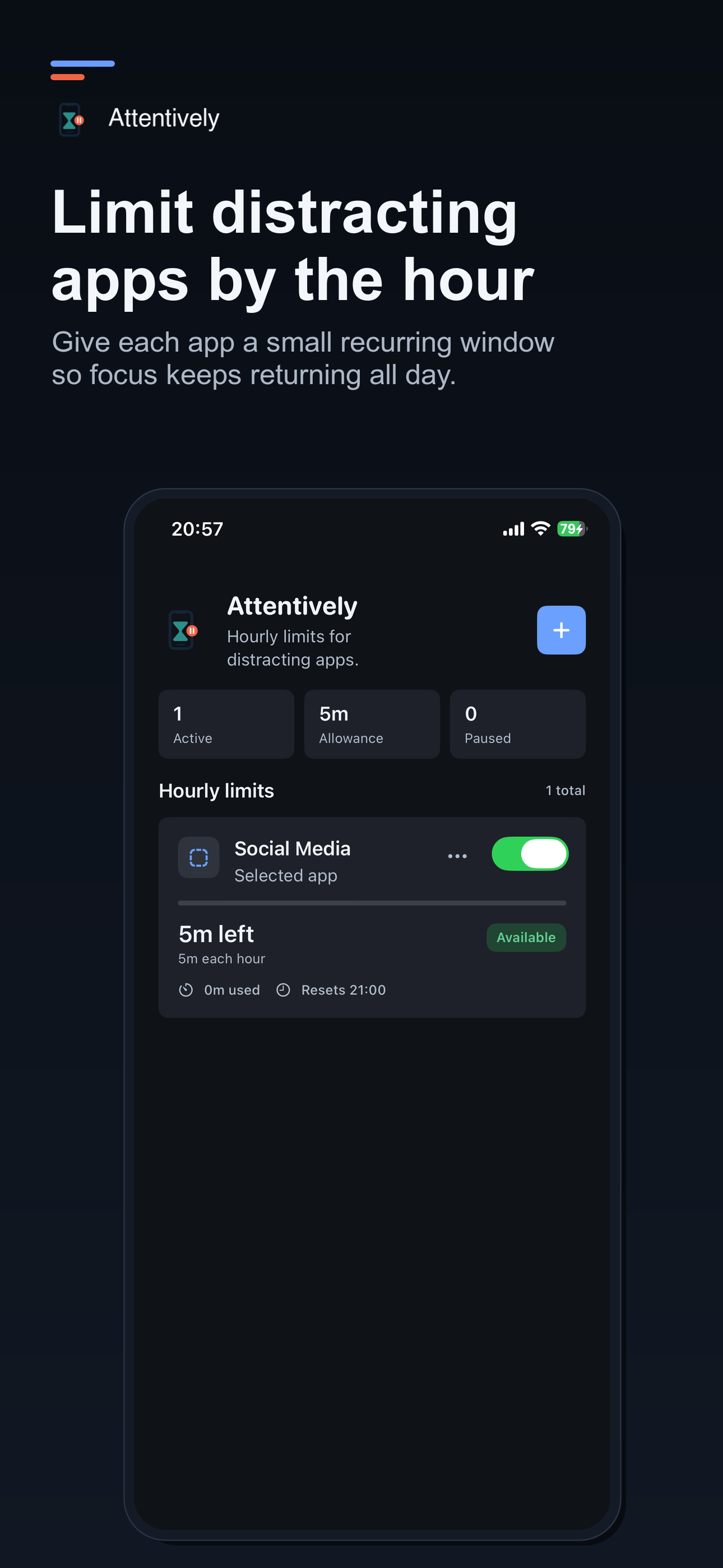
Attentively is different because it focuses on hourly app limits. You choose distracting apps, set a small number of minutes for each hour, and let iOS pause access when that hourly allowance is used. The goal is not to punish you for opening Instagram, TikTok, YouTube, Reddit, shopping apps, or news feeds. The goal is to make stopping easier while your day is still recoverable.
Replace one broad daily app limit with short recurring windows that help you return to focus after a quick break.
Attentively uses Apple's Screen Time APIs for app selection, monitoring, and shielding selected apps on iPhone.
Rules stay on your device. Attentively does not need an account, backend, analytics, ads, or tracking to enforce local limits.
How it works
First, grant Screen Time access when iOS asks. Then create a rule in Attentively, choose the app or app category you want to limit, and set a small hourly allowance. Many people start with two to five minutes per hour for their most distracting apps.
When the allowance is reached, the selected app is shielded until the next hourly reset. You can still adjust your rules as your day changes: pause a rule, change the minutes, or remove the limit when it no longer fits. The app keeps the dashboard simple, showing what is available, paused, or locked.
This makes Attentively useful for people who want an app time limit on iPhone but do not want a strict parental-control setup. It is a self-control tool for reducing distractions, building better focus habits, and making screen time feel intentional again.
Set hourly screen time limits for apps that start with a quick notification check and often become repeated scrolling.
Keep apps available for planned breaks while making it harder to lose a full study block to a feed.
Use recurring limits to add a stopping point before a short pause becomes a full procrastination loop.
Built-in limits vs hourly limits
Apple's built-in Screen Time settings are useful, especially for broad daily app limits and family controls. Attentively builds on the same iOS Screen Time foundation, but focuses the experience on a narrower use case: small hourly app limits for self-control.
That narrower focus matters. If you only need a few minutes to respond to a message or check a feed, a daily cap can feel too blunt. Hourly limits give you a smaller boundary, more frequent resets, and a clearer signal to return to work, school, rest, or real life.
Privacy
Attentively is local-first. It does not require an account or backend service, and it does not use analytics, advertising SDKs, tracking SDKs, or third-party data sharing. Rules and coarse hourly state stay on your device.
If your goal is to reduce screen time, the app should not become another system watching you. Attentively keeps the experience small: choose apps, set hourly limits, and reclaim attention one hour at a time.
Who it is for
Attentively is built for adults, students, makers, and professionals who want help stopping distraction loops without turning their phone into a managed device. If you are searching for an iOS app screen time limit because you keep reopening the same distracting app, the hourly model gives you a practical middle ground.
You can still use the apps you care about, but each hour has a clearer boundary. That makes it easier to check a message, watch a short clip, or look something up without letting the next hour slip away. Attentively works best when you start with one or two apps, set a small hourly allowance, and adjust only after seeing how your attention changes during a normal day.
Available now
Download Attentively on the App Store and set your first hourly screen time limit in a few minutes.
Download on the App Store